The ClearVu Intelligence Python Package
The Python package ClearVu Intelligence allows you to use the design of experiments, automatic machine learning and optimization capabilities of ClearVu Intelligence within Python. Before starting with machine learning you can easily set up design of experiments. For automatic machine learning this includes fitting, comparing, using, loading, saving and exporting models. In order to optimize, you can define objective and restrictions and can take advantage of the state-of-the-art optimizer.
Methods
Design of experiments
Design of experiments allow you a structured approach on generating new data. This can range from a simple Monte Carlo sampling to a Latin-Hyper-Cube sampling to an adaptive approach considering the quality of a model.
Automatic machine learning
Automatic machine learning includes the training of nonlinear models like neural networks, random forest and others and the optimization of the hyperparameter of the training algorithm. Afterward the different modeling approaches are compared and the best model can be selected. The optimization of the hyperparameters uses cross-validation with the aim to minimize the mean error on the validation part.
Evolutionary optimization
The general idea of evolutionary optimization is to mimic the cycle of generations in natural evolution. In evolutionary optimization a candidate solution is called ‘individual’. From an existing set of possible solutions, called parents, a larger set of individuals is created, using some implementation dependent algorithm. From this set of offsprings the best solutions are selected to be the parents for the next generation. This is repeated either for a number of generations or until a sufficient quality has been reached.
1while i <= maxGeneration:
2        # Create offsprings from parents.
3        offsprings = self.next_offsprings(parents)
4        # Adds fitness (quality) values to individuals.
5        self.evaluate(offsprings)
6        # Select parents for the next generation.
7        parents = self.select(offsprings)
8        i += 1
Solution space optimization
First, before diving into solutions spaces, you define the labels “good”/”bad” for designs (sample). A design is evaluated by one or more characteristics (e.g. quality, price, …) where for each characteristics exists a critical value. Thus, a good design fulfills all characteristics requirements where a bad design has one or more characteristics value beyond their critical value.
A solution space is a sub-space of a design space with the property of all designs within the sub-space being good. The optimization task is now to find a solutions space which is a big as possible. To check whether a sub-space is a valid solution space, a certain number of designs is evaluated in the sub-space.
Getting started
Design of experiments
First, you need to instantiate a manager to connect to the ClearVu Intelligence core.
1from cvi import CviBase as Base
2
3manager = Base.Manager()
Then, create a design of experiment by
1doe = manager.create_design_of_experiments()
A design of experiments needs at least a set of variables with limits (in case of real valued variables) and the method to use to generate the samples. The default is the Latin-Hyper-Cube method. Optional restriction functions can be added. For space-filling design an existing sample can be set. An adaptive strategy can be used in order generate samples with aim to improve a model. Hence, the model can also be added to the design of experiments.
Adding variables
For this example you add two real valued variables with a lower bound of -4.0 and an upper bound of 4.0.
1doe.add_variable('x1', -4.0, 4.0)
2doe.add_variable('x2', -4.0, 4.0)
you can change parameters by
1doe.get_parameters()['NumExperiments'].set_value(100)
This sets the size of sample to 100. To get an overview of the current parameters use
1print(doe.get_parameters())
Generating the samples
to actually generate the samples start
1df = doe.create_design_of_experiments()
The new samples are returned as a pandas.DataFrame. You can also get the samples later with
1df = doe.get_doe()
Automatic machine learning
First, you need to instantiate a manager to connect to the ClearVu Intelligence core.
1from ClearVu Intelligence import CviBase as Base
2
3manager = Base.Manager()
Preparing models
The manager object can be used to create or import models. To create a model use
1model = manager.create_model('neural_network')
The list of available model types can be get with available_model_types(). The model object contains information
on how the model will be trained. Therefore, a set of model independent task parameter and a set of model specific parameter can be set.
The default values can be shown using
1model.get_fit_task().get_task_parameters()
2model.get_fit_task().get_model_parameters()
Each parameter is of type cvi.Structures.CvaParameter. To change for example the flag for calculating the variable importance, use:
1model.get_fit_task().get_task_parameters()['DoCalQuartzumriableImportance'].set_value(False)
Cross-validation and optimization are on by default.
Fitting models
In order to fit a model you need a data frame with the data, the names of the input variables (column names) and the name of the
output variable (column name). This package includes some sample data (Quartzum.Examples). The next example uses data generated with the Rosenbrock function.
1from cvi import Examples
2
3example = Examples.data_rosenbrock()
4input_variable_names = example['input_variable_names']
5output_variable_name = example['output_variable_names'][0]
Now you can fit the model with
1model.fit(example['df'], input_variable_names, output_variable_name)
The fit function returns True on success and False, if it is impossible to fit the model. Detailed information can be obtained using the function
1info = model.get_fit_info()
which returns a Quartzum.Structures.CVAModelInfo object. It contains information on quality characteristics, input variable importance,
input variable sensitivity and validation prediction values. For more information refer to Quartzum.Structures.cvaModelInfo.
There are some additional shortcuts to access the information directly.
 1# Quality values
 2df_quality = model.get_qualities()
 3
 4# Variable importance
 5df_importance = model.get_variable_importance()
 6
 7# Variable sensitivity
 8df_sensitivity = model.get_variable_sensitivity()
 9
10# Cross-validation values
11df_scatter = model.get_validation_data_frame()
12
13# For classification
14df_confusion = model.get_confusion_matrix()
Using models
In general, you would like to use the models to predict the outcome of new data. This is done with the fit function.
1y, c = model.predict(df)
Note that not only the predictions y are returned, but also a confidence value for each prediction c. The confidence value is between zero and one.
One means that the possibility of the prediction being right is very high while a low confidence value reduces this possibility. The calculation of the confidence uses
the next neighbors with in the learning data of the new data point and the variances of the output values. The distances are used weight the influence of the neighbors.
There are some parameters which can be used to adjust the conficende calculation.
You can limit the maximal number of neighbors (-1 would use all learning data).
You can define a maximal reach of a data point. Thus, only neighbors which are within a certain distance are used for the calculation. All values are normed to the interval [0, 1]. The maximal reach is defined by a fraction of the diagonal of the design space (\(\sqrt{n}\), \(n\) = number of dimensions).
The default is just restricting the reach by 20% of the diagonal. You can change the values after a model fit with
1# Limit the number of neighbors to 20
2model.set_model_parameter('ConfidenceK', 20)
3
4# Allow further reach (50% of the diagonal)
5model.set_model_parameter('ConfidenceThreshold', .5)
You can switch off confidence calculation with the optional parameter confidence set to False.
1y, c = model.predict(df, confidence = False)
In this case, c is a list of NaNs.
Comparing models
One great advantage of ClearVu Intelligence is the possibility to compare the resulting different models for one task and rank them and pick automatically the best one for the given task. Before starting to compare just fit some different models for one task.
1from cvi import Examples
2
3example = Examples.data_rosenbrock()
4input_variable_names = example['input_variable_names']
5output_variable_name = example['output_variable_names'][0]
6models = [manager.create_model(model_type) for model_type in manager.available_model_types()]
7fit_task = models[manager.available_model_types().index('random_forest')].get_fit_task()
8fit_task.get_model_parameters()['mtry'].set_value(2)
9[model.fit(example['df'], input_variable_names, output_variable_name) for model in models]
Note, that you need to adapt the mtry parameter for a random forest if you have only two variables. Now you have ten different models for the same task. To compare the models use
1comp = manager.compare_models(models)
Quartzum.Base.Manager.compare_models() returns a list of comparisons. The elements are grouped by input variables sets and output variable names.
In this case there is just one entry. To get the best model use
1winner = comp[0].get_winner()
To get the ranking use
1wins = comp[0].get_wins()
A sorted list of tuples of the model and how many times it won against other models is returned. To get a complete overview use
1matrix = comp[0].get_matrix()
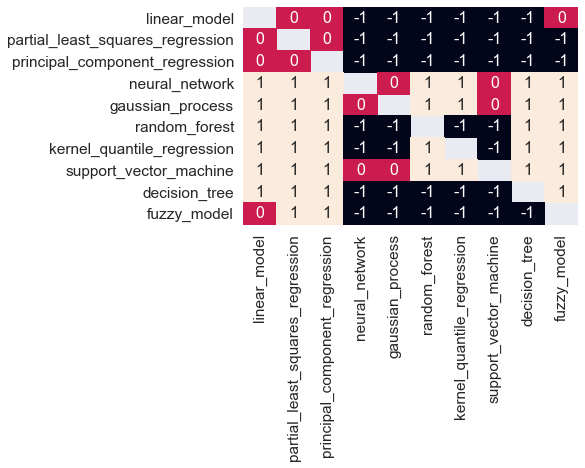
A matrix with pairwise comparison is returned. A -1 means row lost against column, 0 no significant difference, 1 row won against column (see also Quartzum.Structures.cvaModelCompare.get_matrix()).
You can visualize this for example using seaborn.
1import seaborn as sn
2
3sn.set(font_scale=1.4)
4sn.heatmap(comp[0].get_matrix(), annot=True, annot_kws={"size": 16})
This results in the following chart:
Managing models
You can export the model using the function cvi.Models.Model.export(), which writes an xml file which can be used with other ClearVu Intelligence tools. Alternatively,
you can use pickle to save the model. To import an xml file use cvi.Base.Manager.import_model(). To reload from a pickle you can either use the function
cvi.Base.Manager.load_model() or use unpickle and then connect the model with manager via cvi.Models.Model.connect().
New data can be predicted with the model function cvi.Models.Model.predict(). The predict function returns a tuple of the predicted value
and a confidence value. The confidence value is between one and zero, with one being the highest confidence.
Ensemble models
Ensemble models are a type of models that uses several existing models and predicts data with these models in several ways. The possible predict types are
mean_predict: calculates the mean of the predictions of all models
mean_weighted_predict: calculates the mean of the predictions of all models multiplied by their confidence
best_predict: returns the best predictions of each value by the confidence
With the cvi.Base.Manager.create_ensemble_model() method you can make a new ensemble model. You can also set the predict mode here or later, ‘mean_predict’ is the default.
1ensemble_model = manager.create_ensemble_model(models, manager, predict_mode='mean_predict')
After you created the ensemble model, You can set the predict mode.
1ensemble_model.set_predict_mode('mean_weighted_predict')
Now you can use the predict method of the ensemble model like any other model, too.
1y,c = ensemble_model.predict(df)
You can change the predict mode at any time, so you could do the following:
1ensemble_model.set_predict_mode('mean_predict')
2y1,c1 = ensemble_model.predict(df)
3ensemble_model.set_predict_mode('mean_weighted_predict')
4y2,c2 = ensemble_model.predict(df)
5ensemble_model.set_predict_mode('best_predict')
6y3,c3 = ensemble_model.predict(df)
User defined models
In addition to the provided modeling algorithms, you can use or implement your own modeling algorithms and integrate them into the ClearVu Intelligence framework. All you need to do is to implement a wrapper class providing certain functions. To work, the flask package is required.
The following example wraps the regression tree from sklearn. You can use the template class cvi.Models.UserModelInterface as
a basis for the implementation of a new wrapper.
 1class UserModelInterface:
 2        '''
 3        Template class for building a user model. The user model class can be derived from this class. The actual implementation
 4        of the user algorithm must be given as a reference to the constructor and must work with pickle for storing/loading.
 5
 6        .. hint:: A user model is created using the function :py:meth:`cvi.Base.Manager.create_user_model` with an object implementing the function of this interface.
 7
 8        .. code-block:: python
 9                :linenos:
10
11                y, c = model.predict(df, confidence = False)
12        '''
13
14        def __init__(self, model) -> None:
15                self.model = model
16
17        def get_parameter_list(self, input_cnt) -> list:
18                ''' This function should return the list of parameters / hyper-parameters which can be configured or optimized.
19
20                Args:
21                        input_cnt: In order to properly initialize the parameters, the number of input variables is provided.
22
23                Returns:
24                        A list of parameters of type :py:class:`cvi.Base.Structures.cvaModelParameter`.
25                '''
26                return []
27
28        def set_parameter_values(self, parameter_values) -> None:
29                ''' This function changes the current parameter values.
30
31                Args:
32                        parameter_values: A dictionary of name value pairs for the parameters to be changed.
33                '''
34                pass
35
36        def fit(self, df, input_variable_names, output_variable_name) -> None:
37                ''' The fit function should provide the actual training algorithm for the user model. The resulting model should be stored in self.model.
38
39                Args:
40                        df: Learn data as data frame.
41                        input_variable_names: List of input variable names.
42                        output_variable_name: Name of the output variable.
43                '''
44                pass
45
46        def predict(self, df, input_variable_names, output_variable_name):
47                ''' Predict values using new data.
48
49                Args:
50                        df: Data frame to predict.
51
52                Returns:
53                        A pandas.DataFrame containing one column "output_variable_name" with predictions.
54                '''
55                pass
The model object passed to the constructor holds all information to store and load a model. An implementation of a wrapper for the regression could look like
 1import pandas as pd
 2from cvi.Models import UserModelInterface
 3from cvi.Structures import cvaModelParameter
 4from sklearn import tree
 5
 6class SklearnDecisionTreeRegressor(UserModelInterface):
 7
 8        def __init__(self):
 9                super().__init__(tree.DecisionTreeRegressor())
10
11        def get_parameter_list(self, input_cnt) -> list:
12                param_list = [
13                        cvaModelParameter(name='criterion',
14                                value='poisson',
15                                value_type='enum',
16                                description='The function to measure the quality of a split.',
17                                enums=['squared_error', 'friedman_mse', 'absolute_error', 'poisson'],
18                                is_optimizable=True),
19                        cvaModelParameter(name='max_depth',
20                                value=min(input_cnt, 1),
21                                value_type='integer',
22                                description='Maximal depth of the tree.',
23                                is_optimizable=True,
24                                opt_min=1,
25                                opt_max=input_cnt),
26                        cvaModelParameter(name='min_samples_split',
27                                value=20,
28                                value_type='integer',
29                                description='Minimum needed number of samples in order to split.',
30                                is_optimizable=True,
31                                opt_min=2,
32                                opt_max=100)]
33                for param in param_list:
34                        self.model.set_params(**{param.get_name(): param.get_value()})
35                return param_list
36
37        def set_parameter_values(self, parameter_values):
38                for name, value in parameter_values.items():
39                        self.model.set_params(**{name: value['value']})
40
41        def predict(self, df, input_variable_names, output_variable_name):
42                X = df.loc[:, input_variable_names].to_numpy()
43                return pd.DataFrame(index=range(len(df)), data={output_variable_name: self.model.predict(X)})
44
45        def fit(self, df, input_variable_names, output_variable_name):
46                X = df.loc[:, input_variable_names].to_numpy()
47                y = df[output_variable_name].to_numpy()
48                self.model.fit(X, y)
In the constructor you instantiate the regression tree. The :py:meth:get_parameter_list returns the list of parameter used for training. Note, that all parameters will be optimized while training. The new class can be used straight forward.
 1from cvi import CviBase as Base, Examples
 2
 3example = Examples.data_rosenbrock(100)
 4input_variable_names = example['input_variable_names']
 5output_variable_name = example['output_variable_names'][0]
 6df = example['df']
 7
 8manager = Base.Manager(with_flask=True)
 9
10model = manager.create_user_model(SklearnDecisionTreeRegressor())
11model.fit(df, input_variable_names, output_variable_name)
The new model acts as any of the other models. Thus, confidence value calculation, hyperparameter optimization and cross-validation is included. The only thing not possible is the export to other ClearVu Analytics tools.
Because user defined models types cannot be created by the ClearVu Intelligence framework, the parallel modeling functions for the provided model type cannot be used. Instead of create_parallel_tasks() a specialized function for custom models, called create_parallel_tasks_with_user_models must be used. This function takes a dictionary with output variable names as keys and lists of model objects as values.
 1        linear_model = manager.create_user_model(SklearnLinearModel())
 2        decision_tree = manager.create_user_model(SklearnDecisionTreeRegressor())
 3user_models = {}
 4user_models[output_variable_name] = [linear_model, decision_tree]
 5
 6# Different function for user models.
 7models_user_model_tasks = manager.create_parallel_tasks_with_user_models(user_models, input_variable_names, example['df'])
 8
 9# Same call as for provided model types.
10user_models = Parallel(n_jobs=4)(delayed(parallel_fit)(t) for t in models_user_model_tasks)
11[m.connect(manager) for m in user_models]
Optimization
First, you need to instantiate a manager to connect to the ClearVu Intelligence core.
1from cvi import CviBase as Base
2
3manager = Base.Manager()
The manager object can be used to create or import optimizations. To create an optimization use
1optimization = manager.create_optimization()
An optimization task needs to know what to optimize and which values to change in order to achieve that. You need to set at least one objective function, at least one input variable. Optional restriction functions can also be added.
Adding variables
For this example, You add three real valued variables with a lower bound of -100.0 and an upper bound of 100.0.
1optimization.add_variable('x1', -100.0, 100.0)
2optimization.add_variable('x2', -100.0, 100.0)
3optimization.add_variable('x3', -100.0, 100.0)
Implementing an evaluation function
The aim of an optimization can be to reach one or more objectives and optionally fulfill a number of restrictions. You need to implement a function accepting a data frame and returning a data frame with objective and restriction values. Each iteration, the candidate solution spaces are sent as data frame to the evaluation function. The data frame contains a column for each input variable and as many rows as set by the parameter Lambda explained later. The function needs to return a data frame containing a column for each objective/restriction and the same number of rows. The names of the objective/restriction columns must match the names set in the optimization. The names of all objectives/restrictions need to be unique.
The package includes two examples of evaluation functions:
cvi.Examples.optimization_single_objective_evaluation(): A function usingcvi.Examples.function_sphere()andcvi.Examples.function_restriction()to evaluate candidates. This function is used to demonstrate the case of a single objective with one restriction.cvi.Examples.optimization_multi_objective_evaluation(): A function usingcvi.Examples.function_sphere()andcvi.Examples.function_rosenbrock()to evaluate candidates. This function is used to demonstrate a multi-objective case with two objectives.
Adding objectives
The minimum information needed to set an objective function is a name. The same name must be used as the name of the column
that will contain the values for this objective or restriction function in the evaluation function.
These values are calculated by the evaluation function, which has to be implemented and set by you. First, you add an objective
with cvi.Optimizations.Optimization.add_objective():
1# Announce an objective function called 'function_sphere'
2optimization.add_objective('function_sphere', 'Minimize')
Adding restriction functions
The parameters of the cvi.Optimizations.Optimization.add_restriction() function are name, operator, and value.
Again, the name has to be the identifier for the data column which will contain the
restriction values, calculated by the evaluation function.
Operator must be one of ‘<’, ‘<=’, ‘>=’, ‘>’.
1# Announce a restriction function called 'function_restriction'
2optimization.add_restriction('function_restriction', '>', 5.0)
The example restriction function calculates the sum of x1 and x2. A candidate is valid if the value is greater than 5.0.
Setting the evaluation function - the actual optimization problem
A function pointer to objectives and restrictions functions can be set with:
1from cvi import Examples
2
3optimization.set_evaluation_function(Examples.optimization_single_objective_evaluation)
The evaluation function has a simple interface and needs to be implemented by you. The function takes a data frame as input parameter. Each row in this data frame should contain values for all input variables. The data frame returned by this function has to contain the calculated objective and restriction values. The returned data frame may also contain the input values, which makes it easier to use the DataFrame.apply function.
Changing optimization parameters
Parameters of the optimization can be changed with the cvi.Optimizations.Optimization.set_parameter() function.
Most important parameter you may want to change are the number of generations, that will be generated, and
the two size parameters ‘Mue’ and ‘Lambda’. ‘Mue’ is the size of the parent population, and ‘Lambda’
is the size of the offspring population. Please keep in mind, that the parameter values in this example
have been tuned down for a very simple objective function and may be not sufficient for our task.
An initial set of four individuals will be created. The two best individuals will be selected, and the
optimization loop will be run ten times. In each iteration four new individuals will be created, and
the two best individuals will be selected for the next step. This leads to total of 44 created and
evaluated individuals (4 initial and 10*4 within the loop).
1optimization.set_parameter('MaxGeneration', 10)
2optimization.set_parameter('Mue', 2)
3optimization.set_parameter('Lambda', 4)
Starting the optimization
After finishing the setup of the optimization it can be started with:
1bests = optimization.start()
When the optimization finishes successfully, the optimal solutions are returned.
Optimization history
To get the complete history of the optimization run, you can use the cvi.Optimizations.Optimization.get_history() function.
The returns data frame contains all candidate solutions, including the associated objective and restriction
function values. The ‘type’ column contains information about creation and selection of individuals.
The ‘generation’ column contains the generation that the individual belongs to, which is the iteration
counter i, as described above in the evolutionary optimization loop.
1history = optimization.get_history()
x1 |
x2 |
x3 |
function_sphere |
function_restriction |
generation |
|
|---|---|---|---|---|---|---|
… |
… |
… |
… |
… |
… |
… |
10 |
48.70 |
1.14 |
-25.99 |
4017.83 |
79.84 |
1 |
11 |
53.22 |
6.94 |
-39.40 |
4433.68 |
60.16 |
1 |
12 |
73.92 |
36.42 |
-44.27 |
8752.69 |
110.35 |
2 |
13 |
58.86 |
13.99 |
-63.97 |
7753.04 |
72.85 |
2 |
14 |
42.11 |
58.03 |
-57.63 |
8463.68 |
100.15 |
2 |
15 |
75.88 |
-9.28 |
11.42 |
5975.30 |
66.59 |
2 |
… |
… |
… |
… |
… |
… |
… |
The optimization class allows you to optimize a single or multiple objective functions. The following chart shows the complete history of an optimization run in a box plot:
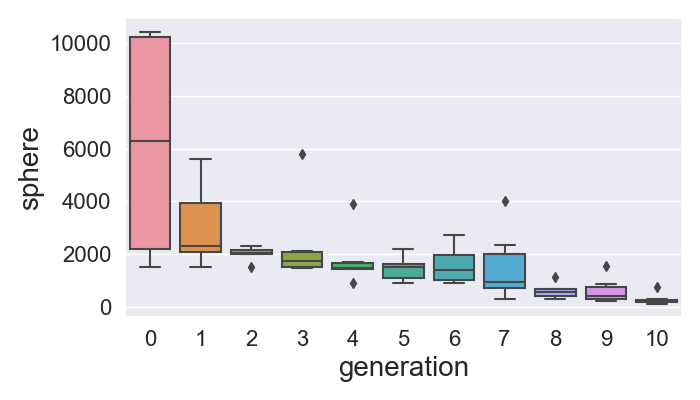
This plot has been created basically with the following lines:
1import seaborn as sn
2
3box = sn.boxplot(x = 'generation', y = 'function_sphere', data = history)
Multi-objective optimization
You can optimize multiple objective functions simultaneously. Just add another function name and calculate the according values in you evaluation function.
1optimization.add_objective('function_rosenbrock')
It is also possible to remove objects from the optimization. To remove the restriction function you can use:
1optimization.remove_restriction('function_restriction')
Now you set the new evaluation function
1optimization.set_evaluation_function(Examples.optimization_multi_objective_evaluation)
Now, the optimization can be started again. Using the cvi.Optimizations.Optimization.start() method triggers a
complete optimization run from initialization to returning results. Previously generated results
will be replaced.
1result = optimization.start()
The sphere function has its minimum at
The Rosenbrock-function has its minimum at
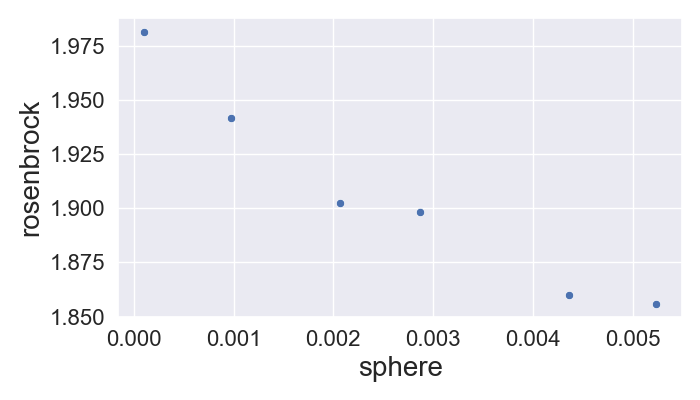
This means that it is impossible to find a single perfect solution. And in this case the optimization will find a set of ‘Pareto-equivalent’ solutions (named after Vilfredo Pareto). Pareto-optimality describes the situation where no objective function value can be better off without any loss of quality in at least one other objective.
Using
1sn.scatterplot(x = 'function_sphere', y = 'function_rosenbrock', data = result)
gives the following chart:
Continue optimization
In case insufficient optimization results, you can continue the optimization by calling
the cvi.Optimizations.Optimization.continue_run() method. It only parameter is the number of additional generations
to perform.
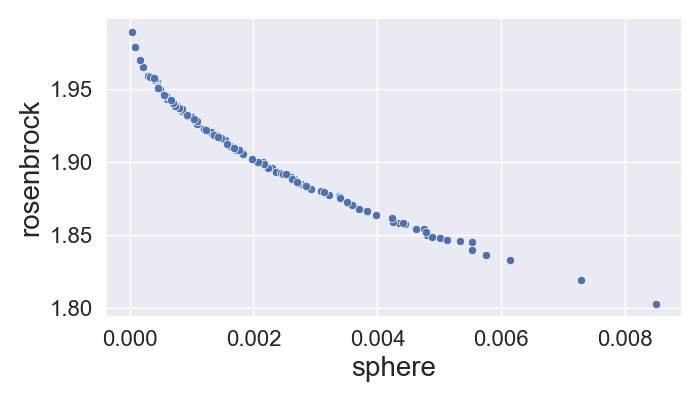
1bests = optimization.continue_run(100)
Which leads to a larger set of Pareto equivalent solutions:
Managing optimizations
You can use pickle to save the optimization. To reload from a pickle you can either use the function
cvi.Base.Manager.load_optimization() or use unpickle and then connect the model with the manager via
cvi.Optimizations.Optimization.connect().